Friday, May 20, 2011

TOS Review: Word Qwerty

Last fall we tried out and reviewed Talking Fingers' Read Write and Type, a program that teaches reading, spelling and keyboarding skills.  Our experience was mixed.  I honestly did not like the program and found the animation and story line annoying.  At first my girls weren't too thrilled with it either.  In fact, in the amount of time we had to use the program before I had to write the review, I was having to make my 7-year-old use the program, just to have enough information to do the review.  I was pretty negative about the program in that review, and some of my main complaints have not changed.

But a funny thing happened: as they used it more, they really were learning some skills that other programs (computer or not) were not teaching them, and once they figured out how to use the program, they started to like it.  The day that Kaitlyn (my 7-year-old) finished the program, she was actually excited that she got all the way through, and suddenly Megan (my 5-year-old) was begging me to "play too".  Since our license was still active, and I was allowed to have one child using the program at a time, I simply shut off Kaitlyn's access to RWT, and started Megan's.  Megan also had some of the same problems, but once Kaitlyn showed her how to use the program, she flew through it and was super-excited to finish as well.  Despite what I still consider a cheesy story-line and awful music, they did learn skills by using it.


So when offered the chance to review Word Qwerty, Talking Finger's sequel to RWT, I asked the girls if they were interested in doing the next level.  They were enthusiastic, and I went ahead and signed up.

Word Qwerty takes kids through the next steps of reading and writing fluency, and picks up where the RWT system leaves off.  It's geared toward 7-9 year-olds, but my 5 year old, who is reading at about a "late 1st grade" level, was able to use it just fine.  Children do not have to use or complete RWT before using Word Qwerty.

RWT teaches how to read, write and type, but at that stage children may have difficulty spelling some words because of the different rules of "construction" in the English language.  Word Qwerty teaches how words are put together in English and uses reading and writing tools - aka, fun games - to help the child gain fluency and comprehension.  

Wordy Qwerty has a total of 20 lessons, each comprised of six parts to guide a child to reading and writing fluency through the program:
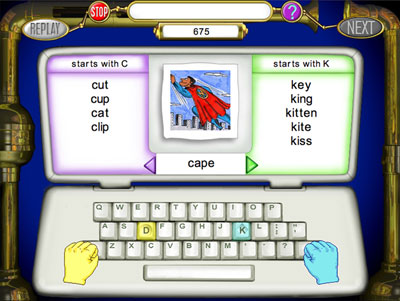
1 - PATTERNS
2 - KARAOKE


  • Patterns – for instance, sorting words by the beginning letter.
  • Karaoke – rhymes and songs teach the 20 rules of word construction.

  • 3 - RECYCLER
    4 - POP-A-WORD


  • Recycler – watching the recycler make new words by changing the first letter.
  • Pop-a-Word – helps recognize outlaw words by memorizing them.

  • WRITE STORIES
    READ STORIES


  • Write Stories – using the spelling rules to types stories that are dictated a line at a time.
  • Read Stories – reading a good story and filling in the missing words.

  • Interested?  Check out this video that explains how the program works:


    You can also check out a free demo AND get a 20%-off coupon to use if you decide to order the program.  You have a few choices in purchasing.  You can choose to use the program online (license is good for 5 years) starting at $25 for one student.  You can also order the program on CD with several hands-on items included (program guide in a 3-ring binder and Jingle Spells on audio CD) starting at $35 for the Home Edition.  While the Home Edition is perfect for homeschoolers, it does not work with Windows 7 or  Mac 10.6. The programs are also available for schools to purchase. For information on School License, Talking Fingers, or the K-4 bundle click here.

    Our Opinion:
    So - that's a lot of information about the program and how it works.  The question you're probably most interested in, is "How did WE like it?"

    The jury is still out.  Like Talking Fingers' Read, Write and Type, I find myself having to coax the girls to use the program.  When we sat down a few days ago to have a frank discussion about what they like and what they don't, they both complained about the songs being "annoying" and "dumb".  Given that memorizing the songs that teach the spelling rules is critical to learning what the program is geared to teach, it seems like a BIG minus.  However, just because they don't like the songs, doesn't mean they haven't learned them.  Several times I've caught both of them singing the various songs as they go about their day (NOT during their time using the program).  On the same topic, both my boys have complained about the music, to the point that we had to institute a "head-phones required" rule for when the girls did Word Qwerty.

    I have noticed a huge gain in both girls' spelling AND reading skills since they started using it.  The strange thing is that if I try to ask them specific spelling questions verbally that incorporate the rules they're learning, they seem to have a poor understanding of how the rule actually works.  For instance, one rule teaches that the "ch" sound can be spelled "ch" as in much or "tch" as in match.  I used those specific words to test their understanding of the spelling rule in this conversation:
    Me: "How would you spell much?"
    Kaitlyn: "M...u...c...h"
    Me: "How would you spell match?"
    Kaitlyn: "M...a...c...h"
    Me: "What other letters, instead of "c...h", could you use to make the "ch" sound?"
    Kaitlyn: "Um....."
    Me:  (wait)
    Kaitlyn: "Um...t...c...h?"
    Me: "Yes!  So...how else could you spell match?"
    Kaitlyn:  "M...a...t...h?"

    However, if I SHOW Kaitlyn  the words much and match she can read them just fine.  Same thing with Megan.

    Overall, I think the program could use some better music, and some revamping in terms of teaching the kids to incorporate the rules verbally, as well as visually.  But it does have some benefits and may work very well for helping kids learn how the English spelling rules work, which may lead to better spelling very quickly.

    Want to know more?  Check out what my other crew members had to say about Word Qwerty here.

    Disclaimer: As a member of the 2010-2011 TOS Homeschool Review Crew, I received a complimentary 2-person license to the online version of Word Qwerty in exchange for my fair, honest and unbiased review. No other compensation was received.


    Friday, May 6, 2011

    TOS Review: Circle C Beginnings

    I'll be honest: I'm not a fan of most "beginning reader" or "early reader" type books.  Maybe it's because every time I look at them hoping to find some good reading material, I'm met with rack after rack of books about the latest Disney movie or pop culture TV show character.  No thank you.  I'd prefer my kids work on their reading skills AND ingest worthwhile, character-building stories at the same time. Which can be a tough order when you're talking about finding both things in a book geared toward new readers.


    Enter the Circle C Beginnings series from Kregel Publications. Now THIS, I can get happily on board with.  The stories are geared toward the early reader, yet they are wholesome, moral stories with both an element of history and the truth of Jesus Christ as God and Savior.

    We received the second book in the series, Andi's Indian Summer.  The story follows Andi, a 6 year old girl living on the Circle C Ranch in California, in the late 1800's.  Andi's friend Riley, an 8 year old boy, reads her a "dime book" story about Indians and Andi finds herself both curious and terrified.  When Andi and Riley encounter real Indians (from the historically accurate Yokut tribe), they both discover that these Indians are nothing like those in the fictional story.  The story teaches good lessons about fear, anger, making good choices and forgiveness.

    The story is just the beginning.  At the beginning of the book, there is a list of new words to help the reader understand some of the historical context that would otherwise be confusing.  After the story ends, there's a note from the author about some of the history that may not make sense to a young child living in today's world.  For instance, when Andi and Riley ride off and end up meeting the real Indians, they are very far from home.  Most children can't imagine having the freedom at age 6 or 8 to not only ride away from home on a horse, but to go so far away from home that they'd lose their way or have to wait until the following morning to return.  The book explains that children in the time period where the book is set would have much more freedom and responsibility at much younger ages than now.

    Besides the rich content of the book, there's also the website.  The entire Circle C Beginnings set is linked to the Andi and Taffy website.  The website offers free coloring pagespuzzles (that can be played on the computer or printed out to cut out and put together) and an entire set of free activities to accompany each book.  The activity set is full of word puzzles, geography studies, dot-to-dots, history studies, a "write your own story" section and much more!  You can also purchase the other books on the site, as well as the resources to Lap Book through each book.

    The books are available directly from the publisher for $4.99 each, or as a 4-pack for $15.96 (plus shipping).  You can purchase them from the Andi and Taffy website, Amazon.com* or through Christianbook.com (offered in sets for $14.99 and up).  There are currently four titles: Andi's Pony Trouble, Andi's Indian Summer, Andi's Fair Suprise and Andi's Scary School Days.  There are two more titles due to be released at the beginning of August 2011 - Andi's Lonely Little Foal and Andi's Circle C Christmas.  Check out the series' You Tube video:


    This was a terrific story for my two new readers.  Kaitlyn is 7 and Megan is 5, and they're both reading at about a 1st grade level right now.  We used this book as a read-aloud with the girls and myself taking turns reading a paragraph.  We stopped after each chapter to discuss what we'd read and check that they were adequately comprehending what they'd read.  We also used several of the activities from the AndiandTaffy website.  They loved the book, and are looking forward to reading the rest of the series.  I also noticed my older son (11) both listening eagerly during our read-aloud times, AND picking up the book and reading it himself (something he rarely does with any books).  I loved the history, adventure and Biblical lessons that these books bring to "easy" reading, and I'll be adding the rest of the series to our library.

    Disclaimer: As a member of the 2010-2011 TOS Homeschool Review Crew, I received a complimentary copy of Circle C Beginnings: Andi's Indian Summer in exchange for my fair, honest and unbiased review. No other compensation was received.


    *The Amazon link is an affiliate link.  If you purchase the books through this link, I receive a small percentage of the sale.

    Wednesday, April 20, 2011

    TOS Review: Nutrition 101

    ONE DAY ONLY:  Tomorrow, April 21, The Old Schoolhouse is hosting a webinar with Sera Johnson, one of the authors of Nutrition 101.  This webinar will take place at 4:00 p.m. EDT.

    Okay, I'll admit it: When I learned that I was chosen to be one of the reviewers for Growing Healthy Homes' Nutrition 101, I was 60% excited and 40% curious.  Or maybe it was the other way around.  I'd heard good things from several people about this health and nutrition curriculum, and I was excited to see it for myself.  But I'm also a HUGE supporter of the Real Food/Weston A. Price movement, and after over a decade of studying nutrition, I have some very firm beliefs about it.  I was super-curious to see whether Nutrition 101 would fit those beliefs.

    Growing Healthy Homes was started in 2007 "to educate and train families regarding God's plan to optimum health as outlined in the Bible."  The product I received, Nutrition 101: Choose Life!, is a three-in-one family nutrition and health program for all ages that presents the major body systems, how they function, their common health issues, the benefits of good food and the consequences of bad food.

    The book is divided into 6 units:


  • The Brain and Nervous System
  • Digestion and Elimination
  • Respiration and Olfactory
  • Muscular and Skeletal Systems
  • Cardiovascular and Immune Systems
  • Endocrine System and Emotions.


  • This book is well-researched, very in-depth and a fantastic study of the way the human body works and how the food we eat can help or hurt us.  Each unit is divided into small, easy-to-digest (pun totally intended) sections with Bible references, excellent illustrations, discussion questions and activities.  There are also art projects, science projects, and yummy, "hands-on" recipes.  As a whole, it's a fantastic tool for anyone who wants to give their children a Biblical, healthy understanding of nutrition.  Not only that, but the book is flexible enough that you could use it with pre-schoolers, or assign it for high school credit.  Truly a great resource for any homeschool!

    *I* (and I stress this, because I have to say that I'm probably the pickiest person I know when it comes to what really is nutritious and what isn't) did not agree with some of the authors' beliefs.  Specifically, I disagree with their take on nutritious fats, and how much fat is necessary.  They say a little, mostly the "good" oils like coconut and olive oil.  I say we - and especially our children - need a LOT of fat (upwards of 50% of our daily calories) and that much, if not most, of it should come from saturated fats, especially animal fats (though I agree on the coconut oil, depending on the type and source).  I was also sad to see no mention at all of soaking or sprouting grains, the health benefits of raw dairy (and conversely the health hazards of pasteurized dairy), and a heavy emphasis on the veggies.  And, I was actually annoyed at their choice to push "raw, blue agave nectar" as their sweetener of choice.  That's probably an argument better suited for a whole other post, but suffice it to say that even the "raw blue" agave is still highly processed, and the liver has to process this sweetener the same way it has to process high fructose corn syrup - it is NOT a healthy alternative to refined white sugar.  Yet the book had at least 25 recipes using it!

    However, even with those reservations, the Nutrition 101 course is so full of good info, and so-well organized and laid out, that I will continue to teach it to my children, adding in the things I listed above as we get to them.  And that's just another great thing about this course - you can add/remove/change things that you may personally feel need to be added/removed/changed without having to go out and try to find something completely different.  The overall information presented is very sound, both Biblically and nutritionally.

    You can check out more about the course by watching this video:


    You can also check out a free excerpt of the book yourself.

    The course is available on CD (e-book format) for $79.95, as a gorgeous, full-color book for $99.95, or a combo pack for $129.95.  My preference would be the combo pack.  It's nice to have the book in hands to read aloud from, flip through and have as a handy reference, but also great to have the e-book format so you can print single pages when needed.

    Want to see what the other crew members thought about Nutrition 101?  Check out their reviews here.

    Disclaimer: As a member of the 2010-2011 TOS Homeschool Review Crew, I received a complimentary e-book copy of Nutrition 101: Choose Life! in exchange for my fair, honest and unbiased review. No other compensation was received.


    Monday, April 4, 2011

    TOS Review: Go Go Kabongo

    I have to admit, even though I have two kids who are not yet completely fluent in reading, my first reaction to Go Go Kabongo was "Another reading game?"  (Don't worry, I kept that one to myself!).  The girls were both super-excited to get yet another online game they "have" to play, as computer time is usually very limited in our house.  I can't tell you how often I heard "Can I play my Go Go Kabongo?", but it was many times, daily.  The other thing I heard, from my older boys, was "I don't think they're doing what they're supposed to do on there; every time I see them using Go Go Kabongo, they're playing a game."


    Well, surprise, boys!  That's the way Go Go Kabongo works.  It looks like a game, but it's actually teaching essential reading skills.


    From the website: What does GO GO KABONGO! teach? Kabongo games do not teach with “right” and “wrong” answers. Instead, they guide children toward better thinking by using an exciting, engaging game design. Children use a wide variety of critical-thinking and problem-solving strategies to play and progress, including these skills that are essential for reading:

  • Attention and focus: Children must be able to focus on important clues and rule out other distracting factors in order to become efficient readers.
  • Working Memory: Children must be able to keep information in their short-term memories long enough to make sense of a word, sentence, or paragraph. For example, repeating ideas back to themselves can help kids remember and make sense of key messages.
  • Processing: Children use different “processing” techniques to derive meaning from what they see and hear.


  • Successive processing: In order to decode words effectively, children have to remember the letter sounds in order and assemble them into a whole. The same is true with words and sentences.

  • Simultaneous processing: As readers advance, they move more quickly through words and passages, “reducing” and organizing the information to make sense of it faster. For example, they begin to recognize certain words, taking each one in as a whole instead of letter by letter. Or, they repeat back the essence of a paragraph, culling out the less important ideas and focusing on the most important concepts.

  • Visualization: When children are presented with more information than they can easily remember, creating a mental picture often helps them process what is being described.
  • Planning: Fluent readers take many factors into account each time they read. They use what they know about individual letters and words, their context in the passage, and their relationship to outside experiences. As children learn to read, they evaluate and apply various strategies, developing planning skills for future learning.
  • Comprehension: All of the skills and strategies above support a child’s ability to derive meaning from what he or she reads. Good comprehension is essential to all kinds of learning, from language arts to science, social studies and more.

  • This chart explains best how each game focuses on specific skills:


    Go Go Kabongo is separated into 3 different "habitats": Twister Top, Galaxy Garden and Laughter Lake.  You can see that each habitat has three different activities and each activity focuses on different skills.  I can tell you from experience with a 5 year old and a 7 year old, that neither of them ever thought they were learning anything, but I knew.  Not just from the way that their honed skills came across in other learning that we're doing, but also from the progress reports Go Go Kabongo was sending me.  I even knew when they weren't using the program, because I'd get a "we haven't seen Kaitlyn in a while" e-mail.  


    I really appreciated the updates.  I also appreciated that it was more than just a quick "this is what Kaitlyn is doing."  Each e-mail explained what each child had done, and what skills that activity was helping them with.  It also suggested activities that I could do, outside of the computer games, to help enhance and reinforce those skills.  I could also go online and view a more detailed progress report, using my parent account.


    Go Go Kabongo is FREE for the first habitat (Laughter Lake), and right now when you sign up you can also get the second habitat (Galaxy Garden) FREE.  The final habitat (Twister Top) is a one-time fee of $4.95.  A fantastic deal for lots of skills practice.  Go Go Kabongo is geared toward kids ages 4-7.  

    I liked this addition to our homeschool.  It could be used for a short span each day, but give the girls a little skills boost to help with their reading.  The games seemed to be well-rounded (if a little childish, but hey, they're geared toward kids!) and simple enough for my youngest to understand.  They don't place arbitrary time limits on the kids, so even a child who is still getting used to the computer can play the games.  And the price is unbeatable!

    Want to see what other TOS Crew members thought about Go Go Kabongo?  Check out their reviews here.

    Disclaimer: As a member of the 2010-2011 TOS Homeschool Review Crew, I received two complimentary memberships to all 3 habitats of Go Go Kabongo in exchange for my fair, honest and unbiased review. No other compensation was received.


    Sunday, April 3, 2011

    TOS Review: Zeezok's ZGuide To The Movies - Mr. Smith Goes To Washington

    Although I consider myself 2nd generation homeschooler, I did briefly attend public schools during my formative years.  There was a short spurt during 1st and 2nd grade, another for part of 5th and 6th grade and a final attempt for my freshman year of high school.  It was during that last foray that I was forced to sit through the movie Mr. Smith Goes To Washington.  I say forced, not because it was a bad movie, or because I didn't want to watch it, but rather because that's how I remember the experience as described by my friends who were in that same government class.  We were given adequate warning of the days on which we'd be watching the movie, and assignments to prepare for it.  And in the intervening days between when we'd been made aware of the upcoming viewing and actually watching it, I listened to all sorts of complaints and gripes about how we were being "forced" to watch a "stupid black and white, pointless movie".  As much as I pretended to have my own opinions back in those days, I can safely say that I jumped right in with the complaining, even though I found myself actually enjoying the movie when we did watch it.

    But this isn't a commentary on how easily persuaded I was to follow the crowd when I was 14 years old.  It's a review, and an admission of how much I've learned since then.


    I have to admit, I was actually excited to watch Mr. Smith Goes To Washington again, this time with my 14 year old, and with the added benefit of Zeezok's ZGuide To The Movies to enrich both our experiences.


    Here's a little bit about the ZGuides in general, from Zeezok:
    Each ZGuide contains a topic overview, movie synopsis, and ten learning activities for an in-depth study of the film. The topic overview puts the film in historical context, giving a student with no prior knowledge of the topic important background information. The one-page movie synopsis provides a more detailed explanation of the movie’s storyline than typically found on the back cover of the video case or on movie review websites. While watching the film the first time through, students answer the movie review questions. This assignment forces the viewer to become an active learner rather than a passive observer. Nine additional activities provide interdisciplinary educational opportunities built around the movie’s themes. Certain activities require the student to use outside resources (library, internet, etc.) to learn more about the topic. Several of the guides contain related memorization selections, combined with a public performance option, to develop the student’s mental powers and public speaking abilities. Creative and critical writing assignments nurture the student’s confidence in putting their thoughts on paper. Every guide contains a “hands-on” activity for the kinesthetic learner, designed to develop the student’s artistic talents. The “Worldview Activity” goes to the heart of critical thinking by asking the student to evaluate the actors’ attitudes and actions. “The Filmmaker’s Art” activity focuses on movie-making techniques and their effect on the viewer. Parents and siblings can contribute their thoughts with the “For Family Discussion” section at the end of each guide. Many of these discussion questions relate to moral or philosophical dilemmas present in the movie.
    The goal of the is not just supplemental educational activities for specific historical topics, but to also teach the viewer to think critically.
    I'm a very strong believer in watching movies as an active learner, rather than a passive viewer!  As a Communications major in college, I learned how important it is to not just allow yourself to be mindlessly entertained (as I admit, I did when I watched Mr Smith Goes To Washington when I was in high school), but to understand the ideas and worldview that the filmmaker is trying to persuade the viewer to agree with.  We've always taught our children that TV and movies are not ever "just entertainment" - that everything they view, from a sitcom to a commercial to a full-length movie, is trying to change their worldview.  As a family, we try to watch things together so that we can discuss them afterwards, and help our children ferret out those truths.

    I loved the ZGuide's approach to this.  As I said, I used it with my 14 year old son, though my younger children (ages 11, 7 and 5) all watched the movie with us and participated in some of the discussion and activities.  Even though the level of this particular movie is above the ages of most of my children, it addresses a topic that we're currently studying (US government).  I was very excited to see that the ZGuide offered several activities that were directly in line with what we were learning about (Activity 2 was all about filibusters; Activity 4 was a quiz about the steps for a bill to become a law).  In short, the movie and the ZGuide were a fantastic supplement to our current study of government.

    Overall, I found the ZGuide to be an excellent addition to our homeschool.  I plan to purchase about 1 ZGuide a month to use with various movies so we can continue these great discussions, and hopefully teach our children an even greater understanding of how to step outside a movie and see it for what it's trying to persuade you to.  My biggest hope would be that after using the ZGuides for a while, they learn to start asking the questions themselves.  I believe that the ZGuides would also be an excellent place to start for adults as well, especially if you aren't used to asking questions of the media you view.

    Currently Zeezok offers 28 ZGuides, for movies like One Night With The King, The Ten Commandments, Driving Miss Daisy, and Flyboys.  Many, if not all, of the movies the ZGuides are available for, can be watched using the Netflix streaming program, which many people have access to.  If you do not have Netflix, many movies can be found at your local library as well.  As a last resort, Zeezok also offers the movies themselves, which can be purchased along with the ZGuide.

    ZGuides are available on either e-books or on CDs, for $12.99 each. If you're interested in what other reviewers have to say about the ZGuides they used, check out their reviews here.

    As a funny (strange, not "ha, ha") aside, I'll admit that as I was walking through the exhibitor hall at the Cincinnati Homeschool Convention yesterday (Saturday, April 2nd), I came across the Zeezok booth and noticed their ZGuides.  And I thought to myself, "I wonder when that review is due?" only to come home that evening and discover that I'd somehow forgotten to put it on my calendar, and it was indeed due April 1st.  Hence, the slightly late review.  My apologies to TOS and Zeezok!

    Disclaimer: As a member of the 2010-2011 TOS Homeschool Review Crew, I received two complimentary ZGuide (e-book) for Mr. Smith Goes To Washington in exchange for my fair, honest and unbiased review. No other compensation was received.


    Friday, March 25, 2011

    TOS Review: Big IQ Kids

    This turned out to be a much harder review to write than I anticipated.  For one thing, Big IQ Kids has a LOT to talk about and for the last several weeks I've been in a decidedly non-talkative mood.  But then I realized that if you really are interested in Big IQ Kids, you don't really want me re-hashing all the same details you can easily find on their website.  So I'm going to give you the short and sweet version of what Big IQ Kids is, and then tell you how our family used it, and whether we liked it.


    Big IQ Kids offers online practice in spelling, math, vocabulary and geography.  It is geared toward kids from Kindergarten to 8th grade, and when used daily can improve proficiency in all those areas.  Each subject can be tailored to your child's current levels - for instance, the spelling portion can be set up to use your child's current spelling words.  It is supposed to be used independently, so parents don't have to hover over their child while the program is being used.


    You can click on the picture above or right here to get a full run-down all on the programs that are offered.  Or, you could just check out this video:

    Big IQ Kids offers quite a few options through their 100% free program.  However, you do get some upgrades if you choose to subscribe to their premium program.  The premium program offers a free 7-day trial, and after that there are a variety of options.  If you chose to subscribe to the premium program for all the subjects, for instance, you'd pay $19.99/month or $99.99/year.  It's cheaper if you only want to upgrade one program - for instance, if you chose to upgrade the math to the premium program, you'd pay $9.99/month of $49.99/year.  You can check out an example of what's included with the free and premium versions here.


    Here's another video that also discusses the differences:


    They offer a "classroom" option for the "per year" subscription, which might be a valuable option if you wanted to use it for multiple homeschooled kids in one family.  They also offer a $9.98/year upgrade for the free program, which just gives the child access to all the games, and the "buddy".  Okay, so what's the "buddy?" would probably be your next question.  The buddy is a customizable avatar (but bigger) that occasionally give the child instructions.

    We had two premium memberships, so I signed up Kaitlyn (7) and Aaron (11).  I did not give them any instructions on how to use the program, but rather "let them loose" to play, explore, learn, and give me their feedback.  Occasionally they'd come to me with a problem, but otherwise they used it on their own.

    Here are the things I liked:

    • One more thing to help hone their basic skills that *I* don't have to plan for, prepare for, or research ahead of time.
    • The daily updates I receive via e-mail help me keep track of what they are learning
    • There were no complaints, even though I told them that I wanted them to spend AT LEAST 15 minutes every day using the program.
    • Program can be customized to each child's learning level for each subject
    Here are a few things I didn't like:
    • Lots of tests, very little learning.  It seemed like they were constantly taking tests, after only a few minutes spent "learning" a subject.  
    • Somewhat TOO EASILY customizable.  In order to customize each program, you log in as the child and just click "modify lesson" to change spelling words, decide how many math problems, etc.  The program does not distinguish between adult and child, so a child who watches you require 50 math problems can go back later and change it to 5 problems.
    • Out of date information.  Several of the states had information that was incorrect or out of date.  I have since read that if you e-mail them, they will very quickly rectify the information, so put one in the bonus column for fast customer service.
    • The ads.  This was my biggest beef.  If I'm going to pay money for an online learning program, I expect it to be ad-free.  Not "minimal" ads, or "occasional" ads.  I pay money, I don't see any ads.  Period.  If I'd been checking this program out before deciding whether to use it, the ads for the paid program would have been a deal-breaker for me.  There is absolutely no reason for a learning site, that you pay money for, to have ads to distract your kids.
    • Naked and semi-naked cartoon characters.  This just bothered me as a parent, as a Christian, and as a person.  One game has the kid dress a character that starts in a bra and panties.  My 14 year old was really offended by this (which is how I came to find out about it).  This would be deal-breaker number 2.  I mean, have some creativity!  There is no reason to expose young kids to naked or semi-naked cartoon characters.  It doesn't matter that they aren't real.  It's pointless and stupid, and I wouldn't pay money or even use a site that chose to do so.
    • The computer voice.  This was especially frustrating for the spelling.  My 7 year old is just starting to be able to read fluently and has barely begun spelling.  When she gets "dinged" on a word because she can't hear the subtle difference between the words FAT and THAT, yet can actually spell both well, it becomes very frustrating for her.  The computerized voice made it nearly impossible for her to do well on her spelling tests, and I had to tell her to stop doing spelling to avoid the tears.
    I hope that some of this helps you decide whether Big IQ Kids might be a good fit for your family.  You can also check out what the other crew members thought here.

    Disclaimer: As a member of the 2010-2011 TOS Homeschool Review Crew, I received two complimentary 1-year Premium Memberships to Big IQ Kids in exchange for my fair, honest and unbiased review. No other compensation was received.


    Monday, March 7, 2011

    TOS Review: Reading Kingdom

    I'm a big fan of teaching children to read using phonics.  As a 2nd generation homeschooler, I've been both the teacher and the student, and I've never been convinced that the whole-word (or "sight word") method really teaches children to decode words on their own.  So color me super-surprised that Reading Kingdom was able to change my mind, if only just a little.


    The Reading Kingdom program has been developed by Dr. Marion Blank, director of the Light on Learning program at Columbia University and author of The Reading Remedy. The interactive lessons teach the six skills (sequencing, motor skills, sounds, meaning, grammar and comprehension) that Dr. Blank theorizes are necessary for reading mastery. You can read all about her theories for reading and how the program works here.  In short, here's what she proposes:


    Dr. Blank says that these six skills are necessary for a child to be able to master reading.  As you can see, she suggests that the pure phonics approach only teaches one of these six skills.

    I must admit, this approach had me question my firmly held beliefs.  After all, a child doesn't really learn to read the word THE by using a phonics approach.  In fact, my favorite reading program, Teach Your Child To Read In 100 Easy Lessons, calls THE a "funny word" and teaches it by having the child learn that it does not work to sound it out, then teaches the correct pronunciation and reviews it for many lessons in a row.  There are quite a few other "funny words" in Teach...; understanding this, I also realized that my approach to reading has never been 100% phonics, and that whole-word does have it's place.

    However, even with my new "enlightened" approach to reading, I wasn't completely convinced that Reading Kingdom is the best approach for a new reader, for two reasons.  First, because I found that the lessons concentrated much more on sequencing than phonics, meaning or comprehension.  In my book those would be the top 3 things that are necessary for a beginning reader.  Second, because most beginning readers are young (age 4-6 usually) and Reading Kingdom required fairly fast keyboard skills, which can be frustrating for these little kids.  Even my older (7) child using the program ended up in tears more than once because it was "too fast".

    On the plus side, the program is structured to allow the child to work independently, which can be a great benefit for those kids who want to learn how to read and are insistent on doing "BY MYSELF!"  Both my girls (age 5 and 7) were able to do their Reading Kingdom lesson on their own each day.  I was able to keep track of their progress with the online progress reports.

    Progress Report Showing Status of Different Skills

    Progress Report Details
    The yellow section shows the session details for a selected skill
    The section at the bottom is the key for the progress report
    Reading Kingdom offers a "kid customized" program.  It starts with a skills survey that assesses the child's abilities in pre-reading, reading and writing. This is an activity that a child completes before starting the actual teaching. It assesses his or her skills in pre-reading, reading and writing. Based on the results, the program places each child at the point that is just right for his or her skill level. This prevents children from wasting time learning something they already know (which leads to boredom) or being faced with tasks that are too difficult for them (which leads to frustration).  The child then embarks on their program that takes advantages of the child's strengths and helps him overcome any weaknesses.  You can read more about how the program works here.

    One of the nice things is that you don't have to commit to Reading Kingdom right away.  They offer a free 30-day trial to get you started.  If you decide that Reading Kingdom is for you, then it is very reasonably priced at $19.99 per month or $199.99 per year (pricing is per child).  You can cancel any time.  Additionally, if you are unable to afford purchasing Reading Kingdom, they offer a scholarship program.  They are that sure that their program works!

    Though Reading Kingdom wasn't a good fit for us, I can see how it could work very well for some families.  Beyond using it to teach reading, it would be helpful for children who have trouble with spelling or reading comprehension.  It seems to be a very well-thought-out program, with science and experience to back it up.  Their free trial and scholarship program shows their dedication to making sure that children get a good start with reading.

    Find out what other crew members thought about Reading Kingdom here.

    Disclaimer: As a member of the 2010-2011 TOS Homeschool Review Crew, I received two complimentary 1-year subscriptions to Reading Kingdom in exchange for my fair, honest and unbiased review. No other compensation was received.